If you are looking for the ASCII diameter symbol, the character you probably want is ⌀, but there is an important technical catch: ⌀ is Unicode U+2300, not an original 7-bit ASCII character. Older Windows and CAD workflows often use Ø, numeric Alt codes, or application-specific sequences such as %%C instead.
That distinction sounds small until a symbol disappears from a drawing, changes after exporting a CAD file, or turns into the wrong character in Word. I have seen this confusion repeatedly in technical documentation: people search for one “ASCII diameter code,” but several different encoding systems are being mixed together. This guide separates them clearly so you can choose the right character for Windows, Office, CAD, HTML, or plain text.
What is the symbol for diameter?
The standard Unicode diameter sign is ⌀, identified as U+2300. It belongs to Unicode’s Miscellaneous Technical block and is used to mark diameter measurements in technical drawings, engineering documentation, and other contexts involving circular dimensions.
The character most people type as a substitute is Ø, which is technically a different character: Latin capital letter O with stroke, U+00D8. The lowercase ø is U+00F8. They can look similar enough to cause confusion, but they are not interchangeable at the encoding level.
| Character | Unicode | Identity | Common use |
| ⌀ | U+2300 | Diameter Sign | Technical diameter notation |
| Ø | U+00D8 | O With Stroke | Common practical substitute |
| ø | U+00F8 | O With Stroke | Lowercase substitute |
| ∅ | U+2205 | Empty Set | Mathematics |
| Φ | U+03A6 | Greek Capital Phi | Context-dependent notation |
So when someone says ASCII diameter symbol, ask what environment they mean. A Windows Alt code, an old CAD escape sequence, and a Unicode character are three different technical mechanisms.
How to type the diameter symbol in Windows
For the exact Unicode diameter sign ⌀, modern Windows workflows can use Alt + 8960 with the numeric keypad. The Alt key remains pressed while you enter the number, then you release it to insert the character. Microsoft guidance also confirms Alt+8960 as the route for ⌀ in current Windows/Office contexts.
However, many older guides call Alt + 0216 or Alt + 157 the “diameter ASCII code.” Those produce Ø, not Unicode U+2300. Dlubal specifically documents Alt + 157 for a diameter character in its engineering text environment, while other engineering documentation uses Alt+0216.
Windows code comparison
| Input method | Result | What it actually represents |
| Alt + 8960 | ⌀ | Unicode Diameter Sign |
| Alt + 0216 | Ø | Latin capital O with stroke |
| Alt + 157 | Depends on environment/code page | Legacy Windows/extended-character behavior |
| 2300 + Alt + X | ⌀ | Unicode conversion in Word |
| Character Map | ⌀ | Direct character selection |
This is why simply memorizing one number can create trouble. The correct code depends on whether your application expects Unicode, a Windows code-page character, or its own CAD symbol mechanism.
How to insert the symbol for diameter in Microsoft Apps
Microsoft Word, Excel, and PowerPoint provide several ways to insert a diameter sign. In Word, one convenient Unicode method is to type 2300 and then press Alt + X, converting the hexadecimal Unicode value into ⌀. The Insert → Symbol interface is another option.
For repeated technical work, the Unicode method is especially useful because it targets the actual character rather than relying on a visually similar substitute. In Word’s symbol dialog, you can also search for the diameter sign and insert it directly. The same symbol menu can make recently used characters available across Office applications on the same device.
Quick Word method
Type:
2300
Then press:
Alt + X
Result:
⌀
This is different from typing 0216, which gives Ø.
For an engineering report, specification, or technical article where character identity matters, U+2300 is the cleaner choice.
How to insert the symbol for diameter on a Mac
Mac users have a different set of character-entry tools. The most dependable universal approach is Character Viewer, where you can search for “diameter” and insert the exact character ⌀. This avoids accidentally choosing the visually similar Ø character. IONOS also documents Mac insertion methods for diameter notation.
Keyboard behavior can vary by application, keyboard layout, and operating-system configuration. That is why a method that works on one Mac may not behave identically elsewhere. For professional documents, Character Viewer is often the safest route when you specifically need U+2300 rather than merely a character that looks similar.
Inserting the symbol for diameter using a Mac keyboard
A commonly documented Mac shortcut is Option + Shift + O, which produces Ø on many standard layouts. But remember that Ø is U+00D8, not the technical Unicode diameter sign U+2300. If exact character identity matters, use Character Viewer and search for “diameter.”
That distinction is particularly useful when creating searchable technical documentation. Two symbols may appear almost identical on screen while carrying completely different Unicode identities underneath. For casual writing, Ø may be perfectly acceptable; for standards-sensitive data, choose the character required by the specification.
Inserting the symbol for diameter from the shortcut menu on a Mac
Mac Character Viewer provides access to special characters without memorizing numeric codes. Open the character panel, search for diameter, and select ⌀. This method is convenient when you need the exact Unicode character and do not want to depend on a keyboard layout or application-specific shortcut.
How to insert the symbol for diameter in Google Docs and tables
In Google Docs, use Insert → Special characters, then search for the diameter symbol. IONOS notes that searching for the letter o can surface relevant circular and diameter characters. Google Sheets does not provide the same direct special-character interface, so copying the character from Google Docs is a practical workaround.
For quick work, you can simply copy this character:
⌀
Then paste it into your document, spreadsheet, email, CMS, or technical note. Copy-and-paste is often the most reliable option when you need the exact Unicode character but do not know whether your current application supports a specific keyboard shortcut.
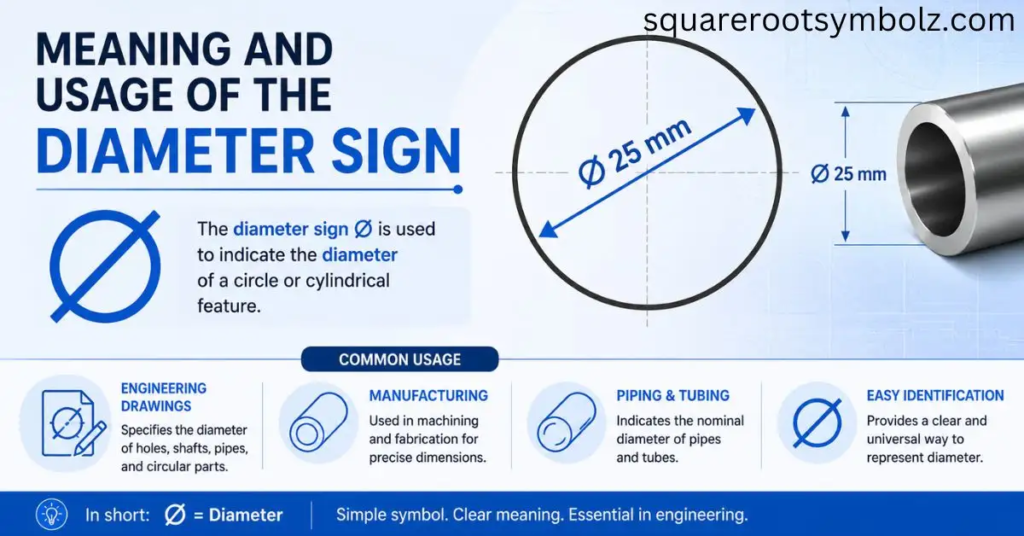
Meaning and Usage of the Diameter Sign ⌀
The diameter sign ⌀ indicates that a numerical measurement describes the diameter of a circular or cylindrical feature. For example, ⌀10 mm means a diameter of 10 millimeters. The character is commonly associated with engineering drawings, technical documentation, blueprints, and dimensional notation.
The character should not be confused with Ø, ø, or ∅. Unicode identifies them separately, and their meanings can differ substantially. The empty-set symbol ∅, for example, belongs to mathematics rather than ordinary engineering diameter notation.
ASCII versus Unicode
This is the most important technical point on the page: the original ASCII standard does not contain the modern diameter sign ⌀.
ASCII is fundamentally a 7-bit character standard with 128 defined characters. The technical diameter sign belongs to Unicode as U+2300. What many websites call an “ASCII diameter code” is actually referring to extended ASCII, Windows code pages, Alt-code input, or an application-specific character sequence.
That explains why you may see several conflicting answers online.
One source may say:
Alt + 157 → Ø
Another may say:
Alt + 0216 → Ø
Another may say:
Alt + 8960 → ⌀
And an AutoCAD guide may say:
%%C → diameter character
These aren’t necessarily contradictory. They belong to different encoding or software systems. AutoCAD documentation and training material use %%C as a diameter-symbol sequence, while engineering software such as Dlubal documents an Alt-based special character method.
ASCII Diameter Code Cheat Sheet
| Need | Code | Result |
| Exact Unicode diameter sign | U+2300 | ⌀ |
| Windows Unicode Alt code | Alt + 8960 | ⌀ |
| Word Unicode conversion | 2300 + Alt + X | ⌀ |
| Common Windows substitute | Alt + 0216 | Ø |
| Legacy code often documented | Alt + 157 | Ø in relevant code-page contexts |
| AutoCAD diameter sequence | %%C | Diameter character |
| HTML decimal | ⌀ | ⌀ |
| CSS escape | \2300 | ⌀ |
The key is to identify the output character, not merely memorize the number.
Why does “ASCII diameter” have so many answers?
Because “ASCII” is frequently used as a loose umbrella term for keyboard character codes. Strictly speaking, ⌀ is not standard ASCII. It is a Unicode character. Meanwhile, Ø was available in various extended character sets and Windows code pages, which is why older engineering instructions often call it an ASCII diameter symbol.
This distinction also explains old CAD documentation. Before Unicode was broadly available, engineering programs often depended on font-specific mappings or special escape sequences. In AutoCAD, for example, %%C is a documented way to produce a diameter character inside text.
HTML and CSS diameter code
For web pages, the exact Unicode diameter sign can be represented using its numeric HTML reference:
⌀
or hexadecimal:
⌀
CSS can represent the same Unicode character using:
\2300
These forms are useful when you want the browser to receive the actual U+2300 Diameter Sign rather than a visually similar O-with-stroke character.
ASCII Diameter in AutoCAD
CAD is one of the places where the phrase “ASCII diameter” has a very practical meaning. AutoCAD-related documentation and training materials use %%C as the diameter sequence in text fields. Older CAD workflows also relied heavily on font mappings and special character codes.
This is different from entering ⌀ as a Unicode character. If you are writing directly inside a CAD program, use the method supported by that application’s version, text style, and font. A Unicode character that looks correct in one font can sometimes render incorrectly after conversion or PDF export.
ASCII Diameter in Engineering Drawings
Engineering drawings commonly place a diameter indication before the dimension, such as:
⌀25 mm
or, depending on the drafting environment:
Ø25 mm
The purpose is simple: the reader should understand that 25 mm is a diameter, not a straight-line length. Engineering software and technical standards may use their own symbol implementations, so consistency within a drawing system matters more than choosing a character merely because it looks familiar.
FAQ Section
Is there an ASCII code for the diameter symbol?
Strictly speaking, ⌀ is not part of the original 7-bit ASCII character set. It is Unicode U+2300. Older Windows and CAD environments commonly used Ø, Alt codes, or application-specific sequences instead.
What is the ASCII code for diameter?
The answer depends on what you mean by “ASCII.” Alt + 0216 is commonly used for Ø, while Alt + 8960 targets the Unicode diameter sign ⌀ in modern Windows contexts.
What is the diameter symbol?
The technical diameter sign is ⌀, Unicode U+2300. It indicates that a numerical dimension represents the diameter of a circular or cylindrical feature.
What is Alt 157 for?
In Windows or engineering software using relevant legacy character mappings, Alt + 157 is commonly documented for a diameter-looking Ø character. Dlubal specifically documents Alt + 157 for the diameter character in its text-block environment.
What is Alt 0216 for diameter?
Alt + 0216 produces Ø, the Latin capital letter O with stroke, in common Windows code-page environments. It is frequently used as a practical diameter substitute.
What is Alt 8960?
Alt + 8960 is used in modern Windows environments to insert ⌀, the Unicode Diameter Sign, when the application supports the method.
Is Ø the same as ⌀?
No. Ø is U+00D8, while ⌀ is U+2300. They can look similar and are sometimes used similarly in engineering documents, but they are different Unicode characters.
What is the AutoCAD ASCII code for diameter?
AutoCAD documentation and training references commonly use %%C in text fields to create the diameter character.
Is the diameter symbol part of ASCII?
The exact Unicode character ⌀ is not part of standard 7-bit ASCII. It belongs to Unicode’s Miscellaneous Technical block at U+2300.
What is the Unicode for the diameter symbol?
The Unicode code point is U+2300 and the decimal value is 8960. Its UTF-8 encoding is E2 8C 80.
What is the HTML code for diameter?
Use ⌀ or ⌀ to represent the Unicode Diameter Sign in HTML.
What is the CSS code for the diameter symbol?
The Unicode CSS escape is \2300, which represents the U+2300 Diameter Sign.
What is the difference between diameter ⌀ and empty set ∅?
⌀ indicates diameter, while ∅ represents the empty set in mathematics. They look similar but have different Unicode identities and meanings.

I’m the creator of SquareRootSymbolz.com, where I publish easy-to-understand guides on symbols, Unicode characters, Alt codes, keyboard shortcuts, and copy-and-paste text symbols. My goal is to provide accurate, well-researched, and user-friendly content that helps readers quickly find the information they need.