The easiest square icon to copy and paste is ■, while □ gives you a clean outlined square. These Unicode characters work well in text, documents, social posts, lists, labels, and simple designs. Other useful choices include ▪, ▫, ▣, ▢, ⬛, and ⬜.
When people search for a square icon, they do not always mean the same thing. Some want a black square, others need an empty box, checkbox, square emoji, or a character they can type with a keyboard. After working with symbols across documents and digital content, the easiest approach is to choose the character based on its purpose rather than its appearance alone.
Square Symbol (Copy and Paste)
Here are some popular square icons and symbols you can copy immediately:
■
□
▪
▫
▢
▣
▤
▥
▦
▧
▨
▩
⬛
⬜
🔲
🔳
◾
◽
🟦
🟩
🟥
🟨
These are Unicode characters, so they are text rather than ordinary image files. Unicode assigns individual characters standardized code points, although their exact appearance can change depending on the font, operating system, browser, or application.
Quick Square Icon Table
| Symbol | Common Name | Unicode |
| ■ | Black Square | U+25A0 |
| □ | White Square | U+25A1 |
| ▪ | Black Small Square | U+25AA |
| ▫ | White Small Square | U+25AB |
| ▣ | Square With Inner Fill | U+25A3 |
| ▢ | White Square With Rounded Corners | U+25A2 |
| ⬛ | Black Large Square | U+2B1B |
| ⬜ | White Large Square | U+2B1C |
For a simple text square, ■ and □ are usually the most useful starting points. The Unicode-based approach also makes copying and pasting easier across many applications.
How to Type Symbols
If copying is not convenient, you can insert a square character using your device’s built-in symbol tools.
On Windows, Microsoft Word supports Unicode hexadecimal input with Alt+X. For example, typing 25A1 and pressing Alt+X produces □ in Word. Character Map is another useful way to browse available symbols.
On Mac, the Character Viewer provides access to many special characters. On mobile devices, copying a square from a symbol page is often the quickest method because keyboard layouts vary between operating systems and apps.
Text Square Box
A text square is different from a graphical square icon. Characters such as ■, □, ▪, and ▫ are actual text characters that can be inserted into a sentence, list, username, caption, document, or webpage.
You can also use more complex box characters:
❏ ❐ ❑ ❒
▣ ▤ ▥ ▦
▧ ▨ ▩
◧ ◨ ◩ ◪
These characters can create visual structure without inserting an image. FSymbols describes square and box characters as useful for text-based graphics, frames, and ASCII-style designs.
Square Icon vs. Square Shape
| Type | Example | Best Use |
| Text symbol | ■ | Text and lists |
| Outline symbol | □ | Checklists and labels |
| Emoji | 🟦 | Social posts |
| Checkbox | ☐ | Forms and tasks |
| Graphic icon | SVG square | Websites and interfaces |
| Shape | □ | Design software |
The difference matters because a Unicode character behaves like text, while an SVG, PNG, or CSS-generated icon behaves more like a graphical object.
Square Emoji
Square emojis provide a more colorful alternative to traditional text symbols.
Common examples include:
🟥 Red Square
🟧 Orange Square
🟨 Yellow Square
🟩 Green Square
🟦 Blue Square
🟪 Purple Square
🟫 Brown Square
⬛ Black Large Square
⬜ White Large Square
Emoji characters are particularly useful in social media captions, messages, status labels, visual lists, and informal digital communication. Their exact appearance may vary between platforms because emoji designs are rendered by different systems and fonts.
For example, a colored square can act as a simple visual marker:
🟩 Available
🟨 Pending
🟥 Unavailable
This makes square emoji useful beyond decoration.
Places Where You Can Use Text Symbols
A square icon can be useful almost anywhere ordinary text can be entered. Common examples include social media, documents, websites, emails, notes, forums, and messaging applications.
You can use ■ to create a simple bullet list:
■ First item
■ Second item
■ Third item
An outline square works differently:
□ Task one
□ Task two
□ Task three
You can also combine square characters to make simple patterns, separators, borders, or text-based designs.
Social Media
Square characters can add visual structure to Instagram captions, Facebook posts, X posts, TikTok profiles, and other text-based content. Because they are Unicode characters, they can usually be copied and pasted without uploading an image.
Documents
Squares can also work in Microsoft Word, Google Docs, presentations, notes, and other text editors. For professional documents, choose simple characters such as □, ■, or ▪ rather than decorative symbols that may be harder to read.
How Do you Type a Square Symbol with Alt Code
Windows users can use Alt codes for several square characters, but there is an important detail: traditional decimal Alt codes depend on the application and character mapping.
For example, Alt + 254 is commonly used for the black square ■ on Windows systems with a numeric keypad. The Num Lock key generally needs to be enabled.
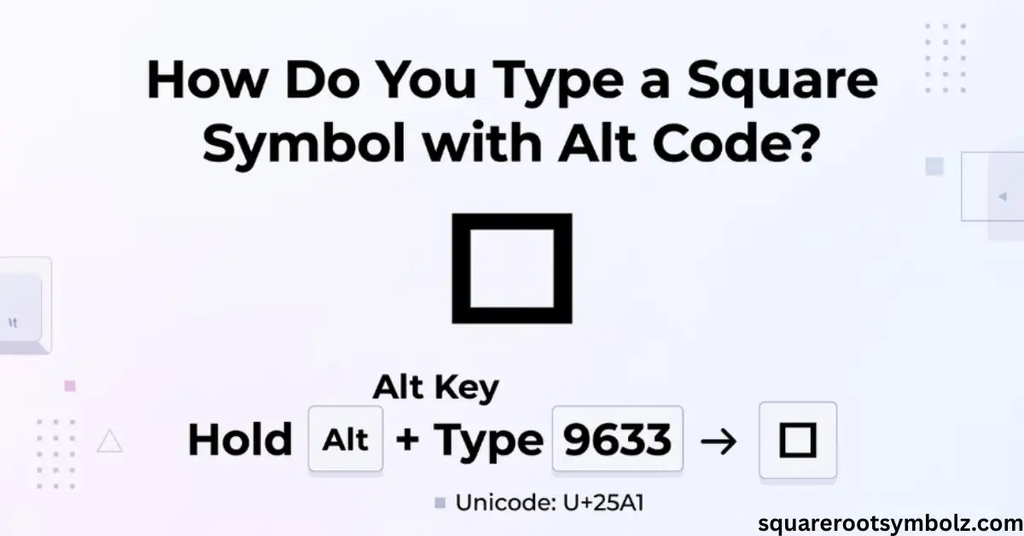
For Word, hexadecimal Unicode input can be more predictable. For example:
25A0 + Alt+X → ■
25A1 + Alt+X → □
This is especially useful when you know the Unicode code point of the character you want.
Alt Codes for Square Symbol
Here are several useful Windows-oriented codes:
| Symbol | Decimal Code | Unicode |
| ■ | 254 | U+25A0 |
| □ | 9633 | U+25A1 |
| ▪ | 9642 | U+25AA |
| ▫ | 9643 | U+25AB |
| █ | 9608 | U+2588 |
| ▄ | 9604 | U+2584 |
| ▌ | 9612 | U+258C |
A caution is worth remembering: decimal Alt codes and Unicode code points are not always interchangeable. The safest method depends on the application. Word’s hexadecimal Alt+X method is specifically designed for Unicode character entry, while traditional Alt codes use numeric keypad input.
Where are text square and box symbols used?
Text square and box symbols are especially useful when you want visual structure without adding an image. They can act as bullets, separators, checklist markers, decorative borders, diagram elements, or simple ASCII-style graphics.
For example:
■ Important
□ Optional
▪ Note
▫ Example
Box-drawing characters can also create larger text patterns, although their appearance can depend heavily on the font. FSymbols notes that these characters are particularly associated with text interfaces and ASCII-style graphics.
How to text square symbols on keyboard
The easiest keyboard method depends on your operating system.
Windows: Use Alt codes, Character Map, or Unicode input in supported applications.
Mac: Open Character Viewer and search for the desired square character.
Linux: Unicode input methods can be used to enter characters by their hexadecimal code.
iPhone and Android: Copy and paste is often easier than memorizing a keyboard sequence, especially for less common square characters.
For everyday use, keeping frequently used characters such as ■, □, ▪, and ▫ in a note can save time.
Character Map
Windows Character Map provides a visual way to browse symbols installed with available fonts. It is useful when you know what a square icon should look like but do not know its Unicode code.
Open Character Map, browse the available characters, select the square you need, copy it, and paste it into your document or application. The available characters can vary according to the fonts installed on the computer.
This method is particularly helpful for users who do not want to memorize Alt codes.
Creating a Box Symbol
If your goal is to create a true graphical box rather than insert a text character, use the symbol or shape tools in your design application.
Microsoft Word, for example, includes a Symbol feature that lets you browse geometric shapes and select different square characters.
For websites and applications, developers may instead use SVG, CSS, icon libraries, or graphical components. A graphical square gives you much more control over dimensions, border thickness, fill color, corners, animation, and responsive behavior.
This distinction is useful: Unicode is best when you need a square inside text; SVG or CSS is better when you need a scalable interface icon.
HTML code
Square characters can also be represented in HTML using numeric character references.
For example:
■ → ■
□ → □
Hexadecimal references can also be used:
■ → ■
□ → □
The character itself can usually be inserted directly into an HTML document when the page is correctly encoded as Unicode. Unicode and HTML references make it possible to represent special characters without relying on an image.
For modern websites, using the actual Unicode character is often the simplest option when the intended use is ordinary text rather than a decorative graphic.
Conclusion
The square icon can mean several different things depending on what you need: a black square ■, an outlined square □, a small square ▪, a checkbox ☐, or a colored square emoji such as 🟦.
For quick copy-and-paste use, ■ □ ▪ ▫ ☐ ⬛ ⬜ cover many common needs. If you need precise control, Unicode codes, Windows Alt methods, Character Map, Mac Character Viewer, HTML entities, or graphical SVG icons provide additional options.
The key is to choose the character based on its purpose. A Unicode square works beautifully in text, while a graphical square icon is usually better for interfaces, websites, logos, and professional design.
FAQ Section
What is a square icon?
A square icon is a visual or text-based representation of a square. Common Unicode examples include ■, □, ▪, and ▫.
What is the best square icon to copy and paste?
For a filled square, use ■. For an outlined square, use □. Both are simple Unicode characters that work well in ordinary text.
What is the Unicode for a black square?
The black square ■ has the Unicode code point U+25A0.
What is the Unicode for a white square?
The white square □ has the Unicode code point U+25A1.
How do I type a square icon on Windows?
Depending on the application, you can use an Alt code, Character Map, or Unicode input. In Microsoft Word, 25A0 + Alt+X produces ■.
What is the difference between □ and ■?
□ is an outlined white square, while ■ is a filled black square. Both are Unicode geometric characters.
Is a square icon the same as the squared symbol ²?
No. ² means “squared” and represents an exponent of two. A square icon such as □ is a geometric character.
Can I use square icons on Instagram?
Yes. Unicode square characters can generally be copied and pasted into social-media text, although the exact appearance may vary by platform and font.
Can I use a square icon in Google Docs?
Yes. You can copy and paste Unicode square characters directly into Google Docs. You can also use its special-character tools when available.
What is the HTML code for a black square?
The decimal HTML character reference for ■ is ■, while its hexadecimal reference is ■.

I’m the creator of SquareRootSymbolz.com, where I publish easy-to-understand guides on symbols, Unicode characters, Alt codes, keyboard shortcuts, and copy-and-paste text symbols. My goal is to provide accurate, well-researched, and user-friendly content that helps readers quickly find the information they need.